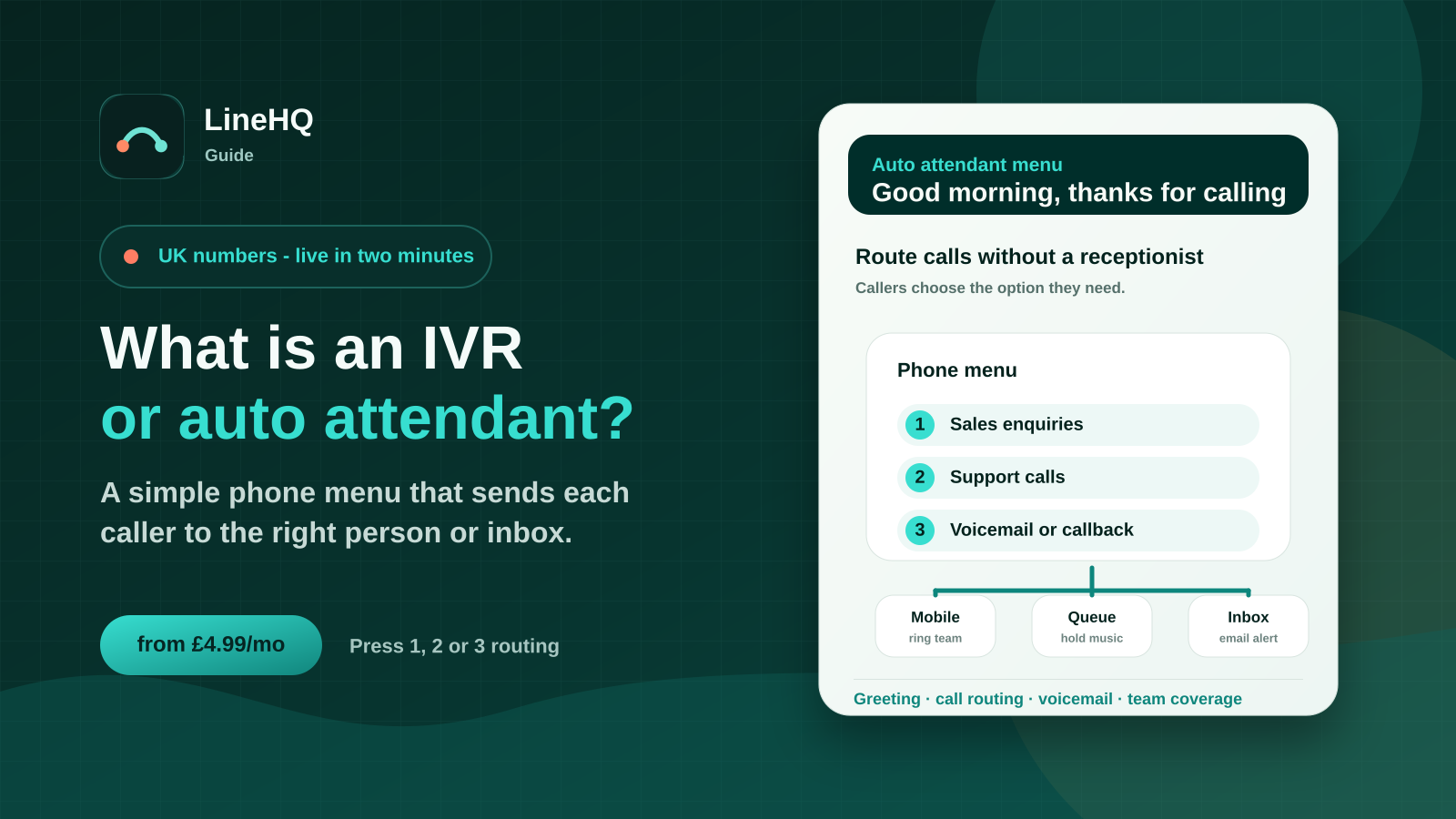
An IVR, or auto attendant, is a phone menu that answers a call and sends the caller to the right place. For a small business, that might mean pressing 1 for sales, 2 for support, or leaving a voicemail when nobody can answer.
What does IVR mean in plain English?
IVR stands for interactive voice response. In everyday business phone language, it means a caller hears a recorded greeting and chooses an option using their keypad or voice. The system then routes the call based on that choice.
An auto attendant is the simpler version most small teams have in mind: a professional greeting, a short menu and rules that send callers to the right person, group, voicemail box or message.
For example, a caller might hear: "Thanks for calling. Press 1 for new enquiries, press 2 for existing customers, or press 3 for accounts." The caller chooses, and the call is forwarded through the business phone setup.
How does an auto attendant route calls?
A basic auto attendant usually has four parts:
- A greeting: the message callers hear when the call is answered.
- Menu options: simple choices such as sales, support, accounts or out-of-hours information.
- Routing rules: where each option sends the call, such as a mobile, a ring group, voicemail or another menu.
- Fallback handling: what happens if nobody answers or the caller does not choose an option.
In a small team, the routing behind the menu can stay very light. One option might forward to the owner's mobile, another to the admin phone, and missed calls can go to voicemail-to-email so they are easier to follow up.
Is IVR the same as a virtual receptionist?
They overlap, but they are not always the same thing. A traditional IVR can become quite deep, with several layers of menus and automated information. A virtual receptionist for a small business is usually simpler: it greets callers, filters the reason for the call and routes it cleanly.
LineHQ's virtual receptionist is designed for that small-business use case. It gives customers a more professional first answer without forcing the business into a heavy contact-centre setup.
IVR vs auto attendant vs human receptionist: which is right?
| Option | What it does | Best fit | Watch-outs |
|---|---|---|---|
| Auto attendant | Answers with a short menu and sends calls to the right person or mailbox. | Sole traders and small teams that need a tidy first answer. | Menus should stay short. Too many choices slow callers down. |
| IVR | Can handle deeper menu paths, information prompts and more structured routing. | Businesses with higher call volume or several departments. | It can feel cold if it is used to avoid answering the phone. |
| Human receptionist | A person answers, qualifies the caller and decides where the call should go. | Businesses where judgement, tone and diary handling matter. | Costs more and needs cover for breaks, evenings and busy periods. |
| AI receptionist | Uses automation to understand caller intent and take basic actions. | Teams that want more automation than a menu but less cost than a full-time receptionist. | Needs careful setup so callers know what is happening and how to reach a person. |
If you are comparing these options in more depth, LineHQ also has a guide to virtual receptionist vs IVR.
When does a small business need a phone menu?
A phone menu is useful when callers regularly need different outcomes. It can stop every call landing on the same mobile and gives customers clearer expectations before anyone answers.
Common small-business examples include:
- a trades business separating new jobs from existing customer queries
- a clinic sending appointment calls to reception and urgent enquiries elsewhere
- a local service business routing accounts calls away from sales calls
- a business owner keeping personal mobile and business calls separate
- a team using out-of-hours voicemail so enquiries are not lost
The menu should match real call patterns. If 90% of callers need the same person, one clear greeting and simple call forwarding may be enough.
When is IVR too much?
IVR becomes too much when it makes the caller work harder than the business problem requires. A five-option menu for a two-person company can feel bigger than the business, and callers may hang up if they cannot see the right route quickly.
For most small teams, a good starting point is one number, one greeting, two or three choices and a sensible missed-call fallback. That keeps the setup professional while still feeling human.
If your business mainly needs a professional number, forwarding rules and voicemail handling, a lighter small-business phone system may be a better first step than a complex IVR tree.
How should you write a good auto attendant greeting?
Keep it short and practical. Say the business name, give the caller the smallest number of useful choices, and make sure there is a route for callers who are unsure.
- Start with the business name so callers know they reached the right place.
- Use plain labels such as new enquiries, existing customers and accounts.
- Put the most common option first.
- Avoid long marketing lines before the menu.
- Test it by ringing the number yourself and timing how long it takes to reach a person or voicemail.
A simple greeting might be: "Thanks for calling Example Plumbing. Press 1 for new jobs, press 2 for existing bookings, or press 3 for accounts. If you are not sure, stay on the line."
Where does LineHQ fit?
LineHQ fits the gap between giving customers a personal mobile number and buying a larger phone system. You can use a UK business number, route calls to mobiles, add a virtual receptionist menu, record calls where suitable and send missed calls to voicemail-to-email.
That means a small team can look more organised on the phone without adding desk phones or a large per-user system on day one.
Start with the LineHQ virtual receptionist, compare wider small-business phone system options, or review call forwarding if you only need calls to reach the right mobile.
FAQs
What is an IVR?
An IVR is an interactive phone menu. It answers a call, plays a greeting, collects a caller choice and routes the call based on that choice.
What is an auto attendant?
An auto attendant is a simpler phone menu that acts like a basic receptionist. It can greet callers and send them to sales, support, accounts, voicemail or another call route.
Do small businesses need IVR?
Some do, but many only need a simple auto attendant. If your callers have two or three common reasons for calling, a short menu can help. If most calls go to one person, basic forwarding may be enough.
Is an IVR better than a receptionist?
It depends on the call. IVR is good for quick routing and predictable choices. A receptionist is better when callers need judgement, reassurance or diary handling.
Can LineHQ set up a phone menu?
Yes. LineHQ's virtual receptionist can answer calls with a greeting and route callers to the right person, team or voicemail route.
Sources
- LineHQ virtual receptionist, accessed 13 August 2026.
- LineHQ virtual receptionist vs IVR guide, accessed 13 August 2026.
- LineHQ small-business phone system page, accessed 13 August 2026.