A marketing campaign should not leave you guessing. With LineHQ, you can buy or assign a separate business phone number for a campaign, use it in your advert, flyer, stand or landing page, then open analytics for that number to see how many calls it produced.
The simple idea: one campaign, one number
If every campaign uses the same main phone number, the call data gets mixed together. A customer might have called from a Google Ad, a Facebook post, a trade fair flyer or a van sign, but you cannot always tell which one made the phone ring.
A separate virtual phone number fixes that. You give the campaign its own number, route it to the right person or team, and measure the calls against that campaign.
Where this works
This is useful for online and offline marketing. You can use a campaign number for:
- Google Ads landing pages
- Meta, TikTok, LinkedIn or other social campaigns
- Leaflets, posters and local print adverts
- Trade fair stands and event banners
- Vehicle signage, shop windows or QR code campaigns
- Partner campaigns where you want a clean source of enquiries
How to set it up in LineHQ
- Choose a new number for the campaign.
- Label it clearly, such as "Google Ads - Hull plumbers" or "Trade fair September".
- Add the number to the advert, landing page, flyer or event material.
- Route the number to your mobile, desk team, receptionist, voicemail or IVR.
- After the campaign starts, open call analytics and filter the report to that specific number.
The important part is routing the number before the campaign goes live. A tracking number is only useful if real customers can get through when they call.
What the analytics page shows
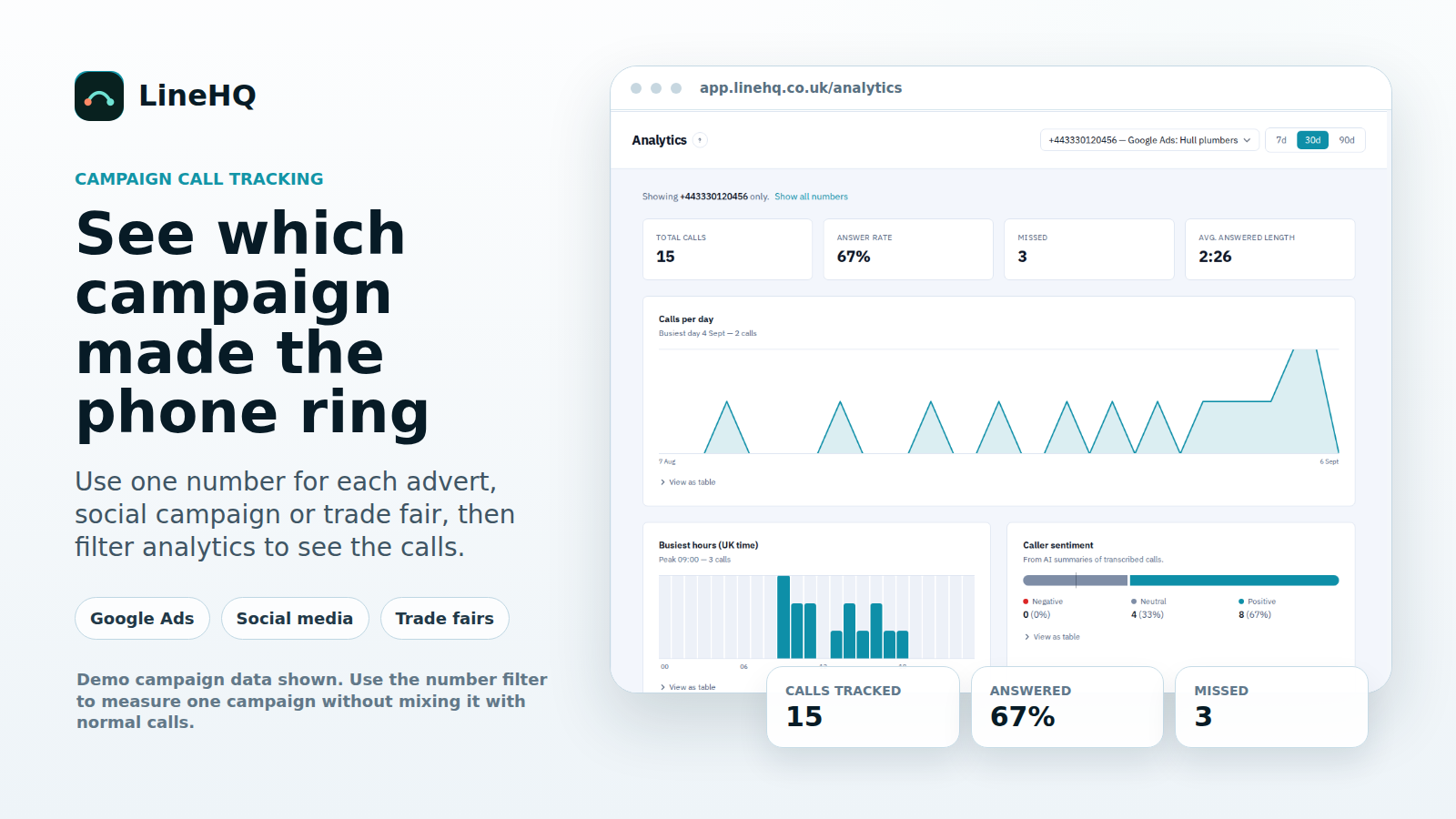
For each number, LineHQ can show the call volume, answer rate, missed calls, average answered call length, calls by day, busiest hours and a by-number comparison. If transcription and summaries are enabled, sentiment can also help show whether the enquiries were mostly positive, neutral or negative.
You can also export the call log as a CSV for the campaign period, which is useful when you are comparing phone enquiries with ad spend, booked jobs, quotes or sales.
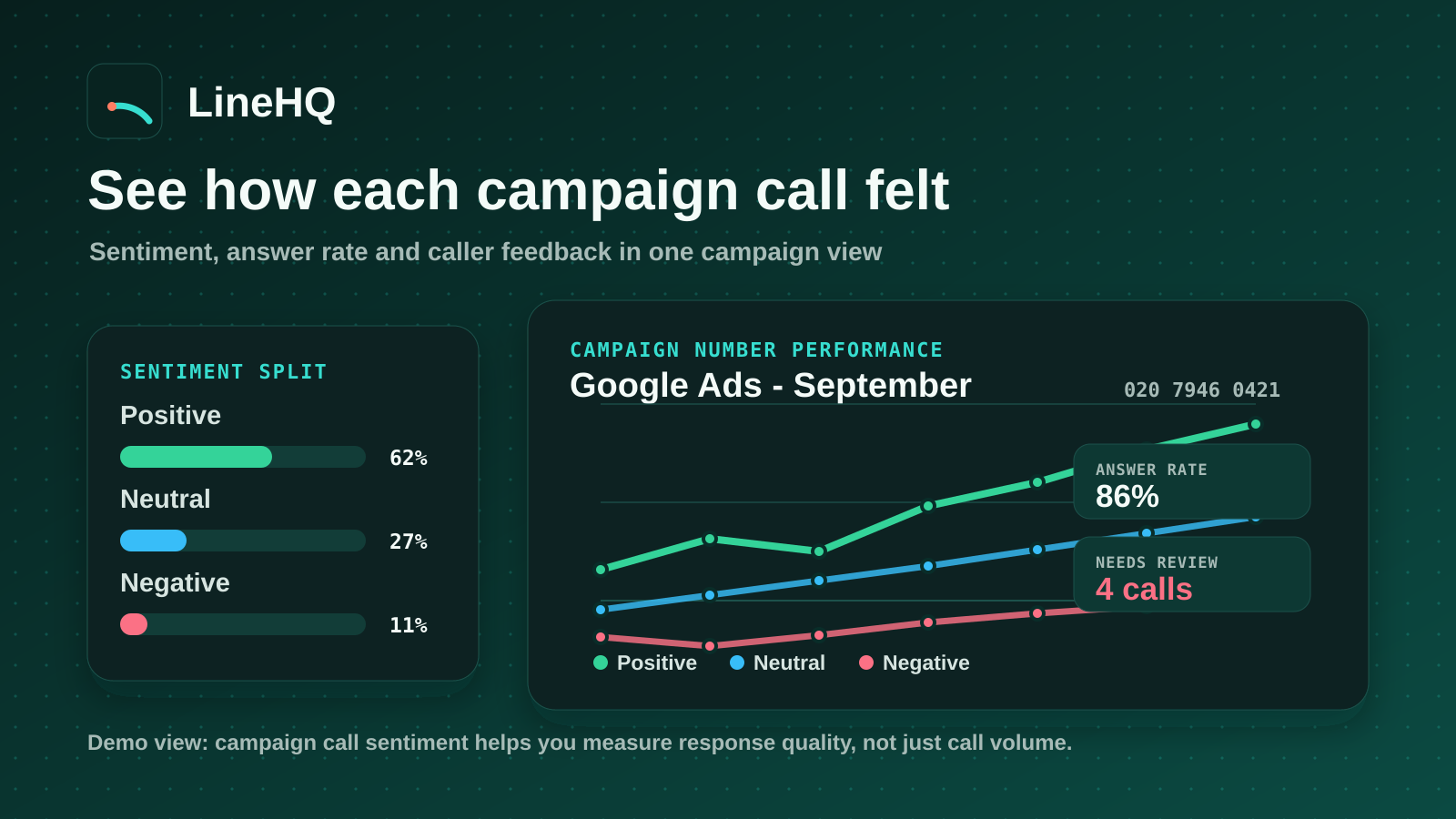
Use sentiment to judge the follow-up
Call volume tells you whether the campaign made the phone ring. Sentiment helps you understand what happened after that. If most calls are positive, the advert is likely attracting people with the right intent and the conversations are landing well.
If negative calls rise, you have something practical to review. You might listen back to recordings, check whether callers waited too long, tighten the offer on the advert or adjust how the team handles those enquiries.
That makes the report useful for team performance too. A business owner can see whether the team answered well, where clients sounded frustrated, and whether changes to routing, scripts or follow-up improved how customers felt after the call.
Example: measuring a Google Ads campaign
Say a business runs a Google Ads campaign for a local service and uses a new LineHQ number on the landing page. After 30 days, the analytics page might show 15 calls, a 67% answer rate and 3 missed calls for that number.
That gives you a much clearer next step than click data alone. You can check whether the advert drove calls, whether the team answered enough of them, and whether missed calls are costing you leads. If most calls came around 9am, you also know when the phone needs cover.
Example: measuring a social or trade fair campaign
The same idea works away from Google Ads. Put a unique number on a social campaign, an event banner, a flyer or a trade fair stand. When the campaign ends, filter analytics to that number and check how many calls it produced.
For offline campaigns, this is often the cleanest way to measure response. There may be no click data, but there is still call data.
Best practice for campaign numbers
Start simple. Use one number per important campaign rather than creating too many numbers at once. Name each number properly, keep the message in the advert and landing page aligned, and check the route with a test call before launch.
At the end of the campaign, compare call volume, missed calls, answer rate and sales outcome. That will tell you more than spend and impressions on their own.
Common questions about campaign call tracking
How do I know which campaign produced a phone call?
Use a different LineHQ number for that campaign and label it clearly in your dashboard. Calls to that number can then be viewed on their own in analytics, so you can separate campaign enquiries from calls to your main business line.
Can I use a tracking number for Google Ads?
Yes. You can use a LineHQ number on a Google Ads landing page, then check analytics for that number. It is a simple way to see whether paid traffic is turning into phone enquiries.
Does this replace Google Ads conversion tracking?
No. It works alongside your ad platform data. Google Ads can show clicks and tracked conversions, while LineHQ shows the phone-call side: how many people rang, how many calls were answered, how many were missed and when callers were most active.
Can I track offline marketing like trade fairs or flyers?
Yes. Use a separate number on the printed material or event stand. Calls to that number can then be measured in the LineHQ analytics page.
Can I compare Google Ads with social media or a trade fair?
Yes. Give each important channel its own number, such as one for Google Ads, one for social media and one for a trade fair stand. The by-number analytics view then helps you compare call response across each campaign.
Do I need a separate number for every campaign?
Not always. Use separate numbers for campaigns where the result matters enough to measure clearly. For smaller activity, one shared marketing number may be enough.
Will a campaign number replace my main business number?
It does not have to. Many businesses keep their normal number for everyday calls and use campaign numbers only where they need cleaner measurement. The campaign number can still route to the same team behind the scenes.
Can I still route the number to my normal team?
Yes. A campaign number can route to the same people who already answer your calls. It can also use call forwarding, voicemail, receptionist handling or an IVR flow.
What should I measure after the campaign?
Start with total calls, answer rate, missed calls and busiest calling times. Then compare those numbers with your spend, quotes, bookings or sales. A campaign with plenty of calls but too many missed calls may need better call cover before more budget is added.
Can I export the call data?
Yes. LineHQ can export the call log as a CSV for the selected number and date range. That makes it easier to review the campaign later or share the result with your marketing team.
Measure the calls, not just the clicks
Clicks, impressions and likes only tell part of the story. If the phone is an important sales channel, campaign call tracking helps you see which activity is producing real conversations.
With LineHQ, you can choose a number, route it to your team, then use the analytics dashboard to measure how that campaign performed. View LineHQ pricing or explore business call analytics to see how it works.